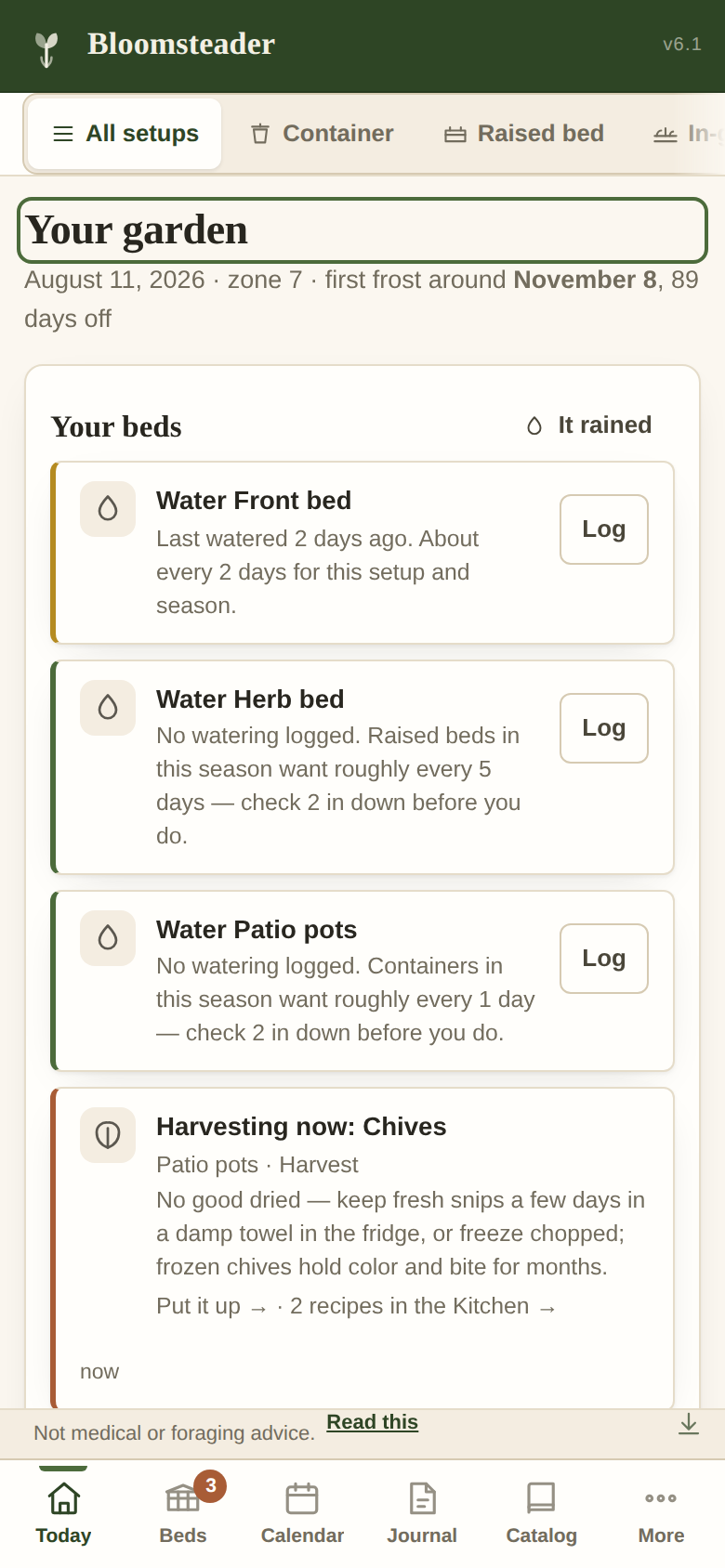
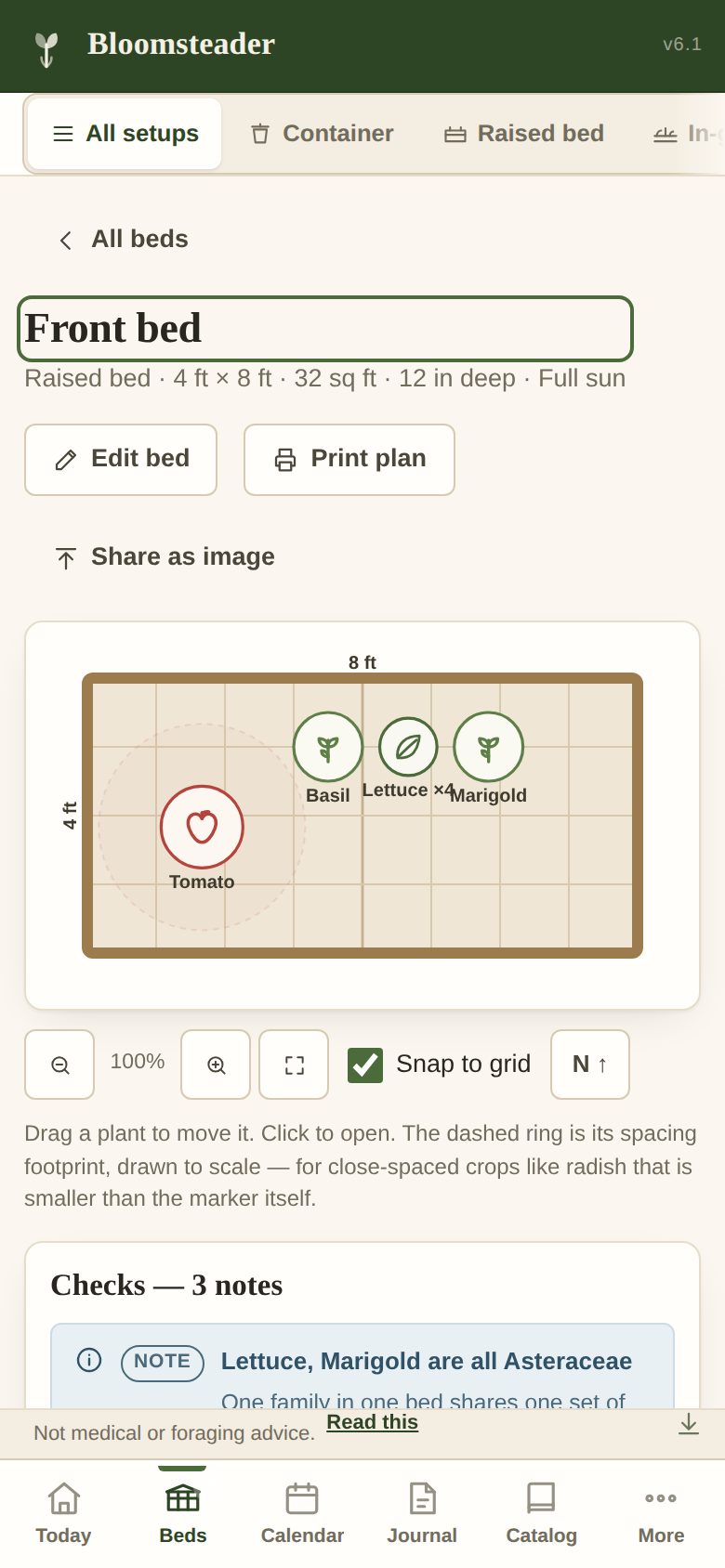
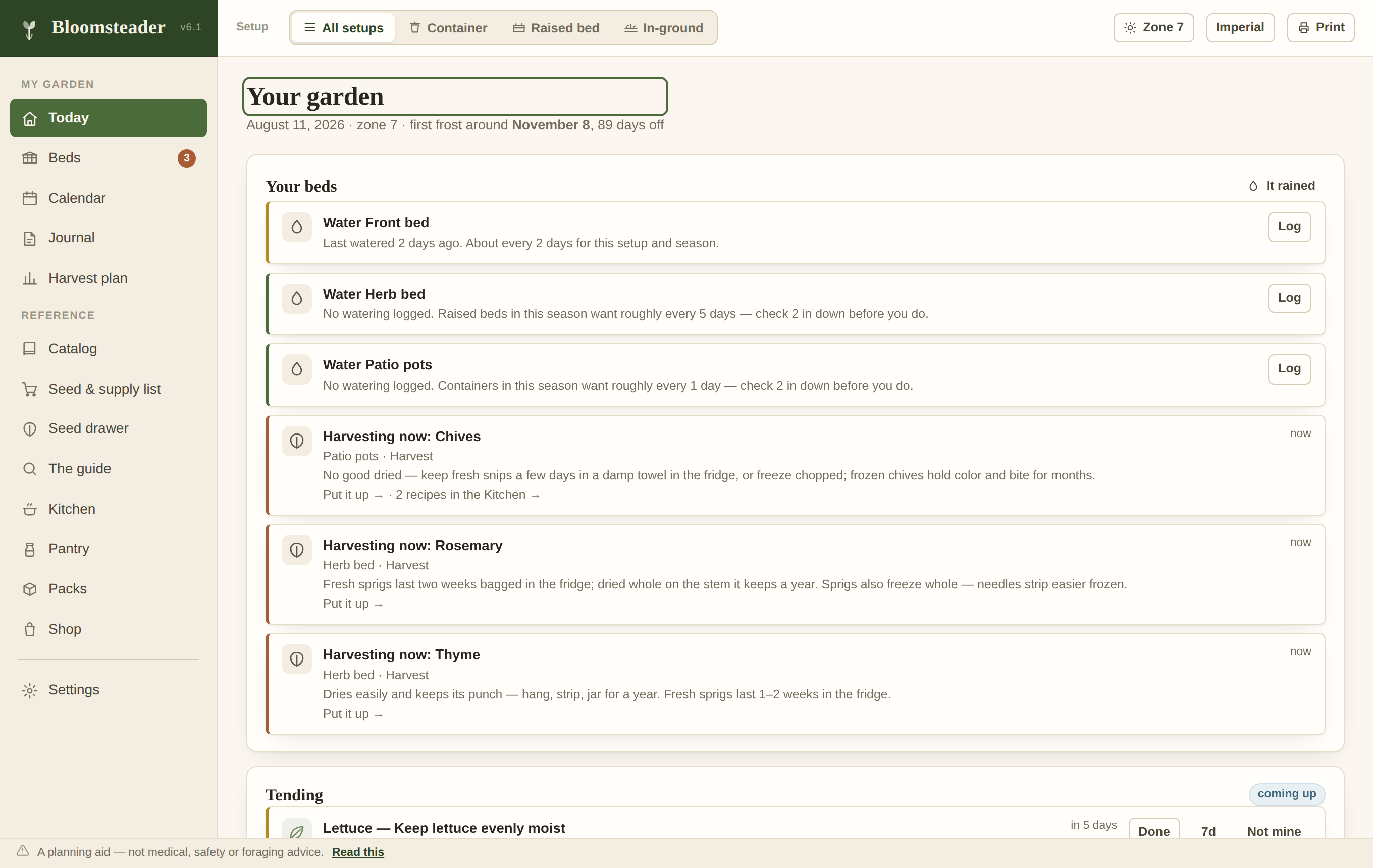
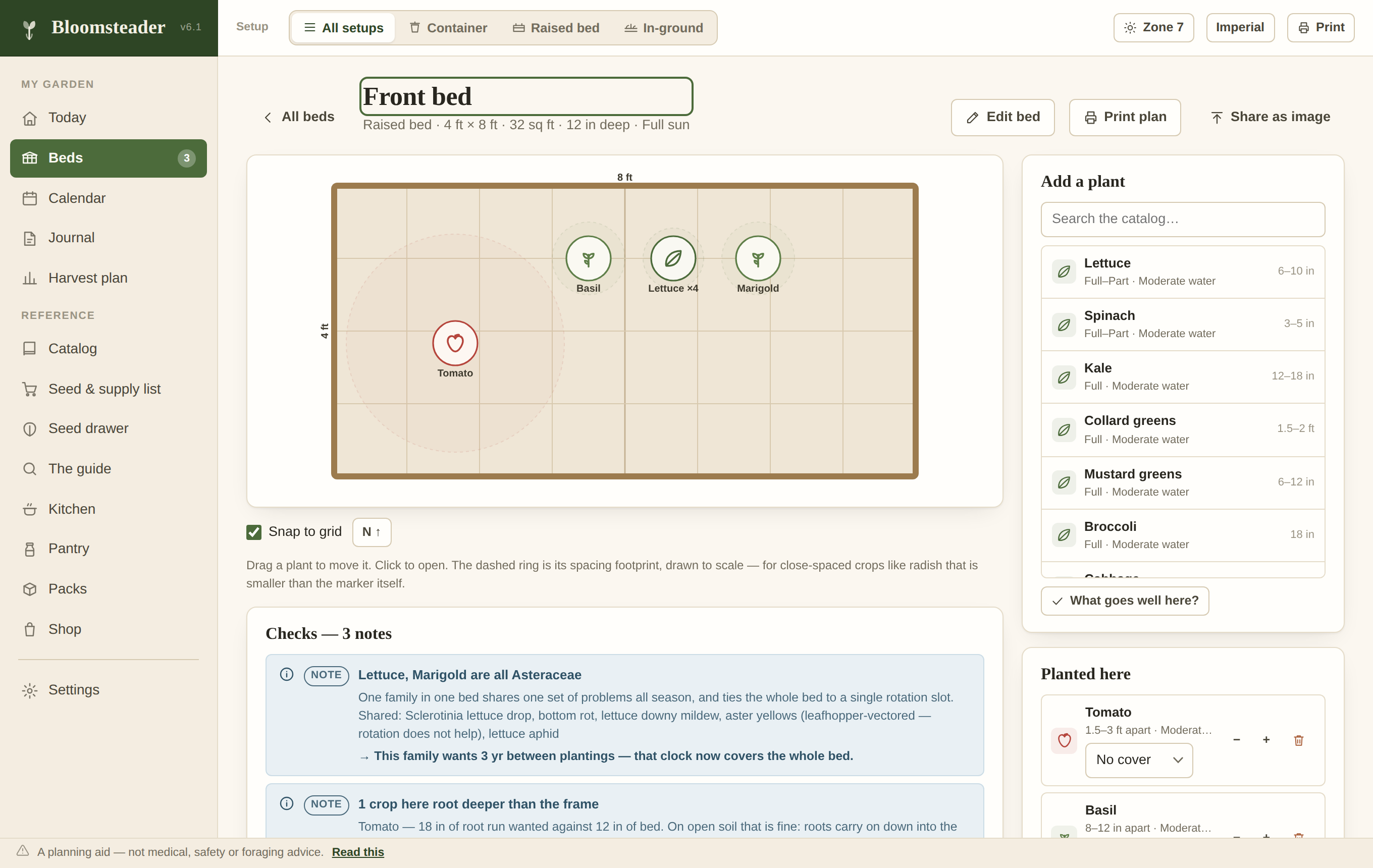
An offline garden planner · one file · yours forever
No account. No subscription. No internet. Bloomsteader is one file that runs in your browser and keeps everything on your own device.
446 plants with companion, spacing, rotation, soil and shading checks · a calendar built from your frost dates · drag-and-drop bed layouts · harvest planning · a care-task engine for the jobs between sowing and harvest · a diagnosis engine for the plants that fail anyway · a full searchable reference. On a desktop, and on a phone in the garden.
From seed packet to pantry shelf
Fifteen views. All of it offline, all of it on your own machine.
Zones, season, sun, water, spacing, days to harvest, container fit, root depth, difficulty, US nativity, deer rating — with companion guidance and plant families throughout. Every safety or legal warning in the reference is carried, shown in red on the plant it belongs to.
Keep-apart pairs and groups, same-family co-planting, rhizome runners, acid-soil needs, Verticillium hosts after nightshades, walnut root zones, rotation intervals, sun and zone fit, water mismatch, spacing overflow and physical overlap.
Zone averages for zones 3–10, overridable with your own. It drives every sowing, transplant, harvest and cover-crop window, with garlic special-cased and three weeks added to fall sowings for shortening days.
Grid or free placement with a snap toggle, drawn to scale, with printable plans. On a phone you can pinch to zoom and move plants with a finger.
Say how much you want — in pounds, servings or quart jars — and it works back to plants, bed area, succession sowings and years to bearing. Backed by yield data for 343 food crops, each figure tagged as extension-published or estimated.
The tending calendar: thin the carrots at two inches, harden off over the week before the transplant date it computed, net the brassicas before the moth flight, hill the potatoes twice. Dated, explained, checkable into the journal — so the record writes itself. Plus a seed drawer with honest germination odds, rain logging that resets the watering clocks, and soil and shading checks per bed.
The app walked you from seed to storage and then handed you forty pounds of tomatoes and no dinner. The Kitchen is 44 recipes keyed to the twenty most-grown food crops — glut-first, searchable, filtered to the crop whose page you came from. Fresh, freezer, dryer, ferments and refrigerator pickles only: shelf-stable canning numbers belong to the tested sources (NCHFP, USDA), and this app states none of its own.
Stand at the counter with twelve pounds of beans and one screen lays out every path, in honest order: eat it fresh (deadline attached), cure and store, freeze, dry, ferment — each scaled to the pounds in front of you — and then the jars. It plans the canning day in jars and lids, puts dated reminders on Today, and the Pantry tracks what you put up, what is left, and honest shelf life. No process figures, ever — times and pressures come from your tested source, and every canning row says so.
Notes, watering, rain, harvests and photos per bed. The seed & supply list is built from what is actually planted, and exports as plain text or CSV. Share cards render the bed plan, the year, a harvest or the pantry shelf to an image — offline, in every tier.
New in v6.2 · free in every tier
The question every gardener actually asks out loud. Answer four — which plant, where it shows, what you can see, what changed lately — and Diagnose ranks the likely causes among 37, each with how to be sure, what to do least-drastic-first, and the look-alike it is most often confused with.
One key opens both
They are the same app. The difference is only where the file lives.
Best on a phone or tablet. Tap Open Bloomsteader, then add it to your Home Screen. It installs like an app, runs with no signal, and keeps your garden indefinitely. Nothing is uploaded — the page is just how the file reaches your device.
Best on a desktop or laptop. Download bloomsteader.html, put it
anywhere, and double-click it. It is yours: no site to go offline, no version to be
withdrawn. It will still open in ten years.
Buy it once · own it · never hear from us again
The competition charges $29–96 a year. Bloomsteader is three tiers, one file, no account, no subscription — and founder pricing until launch closes.
Founder price — goes to $14.99 after launch
One purchase, yours forever. Not a trial, not a subscription.
Founder price — goes to $24.99 after launch
Your licence key arrives by email; paste it in once. No account is created.
Founder price — goes to $34.99 after launch
Cheaper than Bloomsteader plus the pack bundle, and there are no files to keep track of.
All five together — $24.99
Already own Bloomsteader or Lite? Buy packs one at a time, or upgrade to Full — an upgrade is a key, never a new app.
Two taps
It behaves like any other app on your home screen.
Tap Open Bloomsteader above. Give it a moment on the first visit — it is downloading the whole app, once.
Tap the Share button (the square with an arrow), scroll down, and choose Add to Home Screen. Safari, Chrome and Firefox on iOS can all do this — each keeps the Share button somewhere slightly different.
An Install button appears in the app's own top bar, or use your browser menu and choose Install app / Add to Home screen.
It works with no signal, keeps your garden between visits, and takes the whole screen.
Stated up front
Because a garden planner that oversells itself costs you a season.
The same plain speech, in the other direction — what the app holds, and exactly how far each part goes.
| The catalog | The full 446-plant reference, including all 122 plants whose entries carry safety or legal warnings — each shown in red on the plant. |
| Frost dates | Default to zone averages, which can be two to three weeks off for a particular site. The app says so and invites you to enter your own. |
| Yield figures | Ranges, and wide ones. 203 of 343 are estimates rather than extension figures, and nine crops have no usable figure at all. Every row is labelled with which it is. |
| Diagnosis | Ranked likelihoods, not verdicts. Every candidate carries how to confirm it, and when two causes fit equally, the app says so instead of picking one. |
| Your data | Lives in your browser's storage on that one device. It is not synced anywhere. Use Settings → Export garden file to keep a real backup — clearing your browser's site data will erase the garden. |
| Photos | Capped at 60 on Bloomsteader (unlimited with Lite and Full), shrunk to 1000 px, kept in the browser's own database. They travel with an export. |
| The Shop | A curated list of links, not a store. Bloomsteader never takes a payment — every product opens the store in a new tab, and nothing loads unless you tap it. Some links may earn a commission at no cost to you; prices shown are a guide, not a quote. |
| Zones | USDA hardiness zones 3–10. Useful elsewhere if you know your equivalent, but the plant list and the frost model are US-centred. |
| Browsers | Current Chrome, Edge, Firefox and Safari, on desktop and mobile. It needs a browser from roughly the last five years. |
Sources named, always
The catalog, the companion guidance and the reference text are parsed from Edible & Useful Plants for the Home Garden, which draws on Garden.org, the USDA PLANTS Database, The Old Farmer's Almanac and US cooperative extension services. The full reference ships inside the app, searchable, so you can always read what a recommendation was based on. Yield figures were researched separately for 343 food crops, and every one is tagged in the interface with its source and whether it is a published figure or an estimate.
Before you buy
The short honest versions.
As a licence key, by email, within a day of purchase — usually much faster. Paste it into the app once and you are done. The key is yours forever, works on every device you own, and is verified offline: no account is created and nothing phones home.
No. Every price on this page is a one-time purchase. There is nothing to renew, nothing that expires, and no way for us to charge you again — we don't have your card, our payment processor does, once.
Yes — buy the higher tier and paste the new key over the old one. An upgrade is a key, never a new app, and your garden stays exactly where it was.
Only to get it the first time. After that it runs entirely offline — in the garden, in a dead zone, on a plane. Your garden data never touches the internet at all.
Nothing. The app is a file on your device, your data lives on your device, and your key verifies offline. The download version will still open in ten years. Export your garden file from Settings now and then, and you are unsinkable.
Reply to your receipt email and we will send it again. It is a licence, not a login — there is no password to forget.